
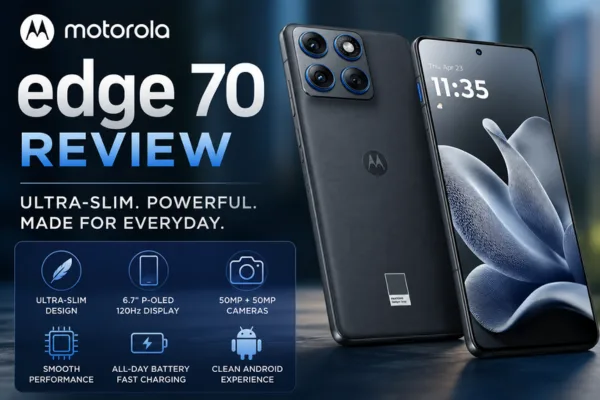
If you want a phone that feels nearly weightless in your hand while still delivering solid performance and camera results, the Motorola Edge 70 may be the answer.
Motorola Edge 70 Review explores how this ultra-slim phone balances style, battery life, camera performance, and everyday speed to solve the most common smartphone frustrations: bulky designs, average displays, and inconsistent battery life.
This review examines the Edge 70’s design, screen, cameras, performance, battery and software to help you decide whether it’s the right fit.
Design and build
The Motorola Edge 70 stands out for being exceptionally thin and light in a market where phones keep getting heavier. It uses a glass front and back with a metal frame that keeps the phone feeling premium while shaving millimeters from the thickness.
The slim profile improves one-handed use and pocket comfort, but it also means a smaller battery-size envelope than some chunkier rivals. Still, Motorola’s engineering keeps the phone sturdy and comfortable for daily handling.
Display and multimedia
The Edge 70 sports a vivid 6.7-inch P-OLED display with a high refresh rate and 10-bit color support for smooth scrolling and accurate color reproduction. Brightness is good for indoor use and acceptable outdoors; HDR content looks punchy thanks to deep blacks and strong contrast.
The combination of high resolution and 120Hz refresh rate makes games and UI animations feel fluid, while stereo speakers provide clear audio for videos and calls.
Camera system
Motorola Edge 70 Review covers a versatile camera setup built around a 50MP main sensor paired with an ultra-wide 50MP secondary sensor and useful software features. Photos from the main camera deliver solid detail and natural color in daylight, while the ultra-wide preserves fine detail with minimal distortion.
Night and low-light shots are acceptable thanks to optical image stabilization on the main lens, though they may show more noise than flagship competitors. Selfies are sharp and suitable for social sharing.
Performance and everyday use
Under the hood, the Edge 70 uses a modern mid-to-upper-range chipset that handles daily tasks, multitasking, and most games with ease. App launches are snappy and memory management is effective, especially with RAM expansion features.
Sustained workloads keep performance steady; thermal throttling is minimal for typical users but heavy gamers should expect some temperature rise after long sessions. Overall, the phone feels responsive and reliable for everyday use.
Battery life and charging
Despite the slim frame, battery life on the Edge 70 is designed to comfortably last a full day for moderate use thanks to optimized software and efficient hardware.
Faster wired charging support gets the phone back to usable levels quickly, and wireless charging provides convenience when you’re near a compatible pad. Power users who push the screen to 120Hz for long gaming sessions should plan for a midday top-up on heavier days.
Software and features
The Motorola Edge 70 Review highlights Motorola’s near-stock Android experience with useful software additions like ready-made productivity and camera shortcuts. The UI is clean, with minimal bloatware and timely feature additions that enhance day-to-day convenience.
Motorola’s bundled features focus on usability rather than gimmicks, including customizable gestures, helpful camera modes, and software optimizations that preserve battery life.
Pros and cons
Pros:
- Ultra-slim, premium-feeling design that’s comfortable to hold.
- Vivid 6.7″ P-OLED display with 120Hz smoothness.
- Solid 50MP main and ultra-wide cameras with OIS.
- Responsive performance for daily tasks and most gaming.
- Fast wired charging and wireless charging support.
Cons:
- Slim build limits maximum battery capacity versus thicker rivals.
- Low-light photography trails top-tier flagships.
- Heavy gaming can raise temperature and reduce long-session comfort.
Who should buy it
- Buy the Motorola Edge 70 if you prioritize a light, elegant phone that still delivers dependable performance and excellent display quality.
- Consider other options if you need the absolute best low-light camera or the largest battery life available in the segment.
Practical tips and settings
- Enable adaptive refresh (auto 60–120Hz) to balance smoothness and battery life.
- Turn on camera stabilization modes for handheld night shots to reduce blur.
- Use RAM expansion only when you run many apps at once; it improves multitasking but can slightly impact storage longevity.
- Apply a thin protective case to preserve the slim profile while protecting against drops
Motorola Edge 70 Review vs competitors:
- Versus bulkier mid-range phones: Edge 70 wins on comfort and handling, while some competitors may offer larger batteries.
- Versus flagship phones: Edge 70 is more affordable and slimmer, but flagships typically beat it in camera low-light performance and peak GPU power.
FAQs
Q: How long does the Motorola Edge 70 battery last on a single charge?
A: For average daily use with mixed browsing, calls, and media, you can expect roughly a full day of battery; heavier gaming or constant 120Hz usage will shorten that to less than a full day.
Q: Does the Motorola Edge 70 support wireless charging?
A: Yes, the phone supports wireless charging in addition to fast wired charging, which is convenient for desk or bedside top-ups.
Q: Is the camera good for night photos?
A: The main camera performs well in daylight and controlled low-light, but it won’t match flagship-level night photography—use night mode and stabilization for best results.
Q: Does the Edge 70 have an IP rating?
A: The phone offers water resistance design cues, but check official product pages or retailer listings for the exact IP rating applicable in your market.
Q: Which storage and RAM configurations are available?
A: The Edge 70 comes in multiple RAM and storage options to fit different needs; higher configurations improve multitasking and future-proofing.
Conclusion
The Motorola Edge 70 Review shows a phone that successfully marries ultra-slim design with balanced performance, a strong display, and capable cameras—making it an appealing pick for users who value ergonomics without sacrificing everyday power.
If you want a lightweight device that handles daily tasks smoothly and looks sharp, the Edge 70 deserves a close look.